I'm really happy to announce that Kwik-E-Tweet now is available as a iPhone app at App Store. For now it's a Swedish-only verion, but we're working on the English one. Download and have fun! I would be really happy for some response, good ratings and help with spreading the word.
Take care
Robert
torsdag 25 februari 2010

onsdag 6 januari 2010
This little tweet came from my iPhone
Yes. The prototype is phonetweeting like crazy. Most bits up and running but with some (hopefully) minor adjustments left. Some better graphics, interface improvements and so on. As you may see on the screenshot below, this baby is gonna let you Kwik-E-Tweet your status on Facebook, Twitter and also send it as mail. Great huh?
tisdag 5 januari 2010
Soon on a phone near you!
Hi folks. It's been a long time. Don't even ask about the recent history of this project... but it's back! I've thrown the AIR-version aside and refurnished the idea a bit. Thanks to a new fantastic friend it looks like the Kwik-E-Tweet's gonna make it into the mobile era! So, here's a really early screen on what's going on thanks to Markus and his App Factory. Any feedback is appreciated.
Take care!

In the making.
Take care!

In the making.
torsdag 20 augusti 2009
English version, anyone?
How's the interest for an english version out there? Just trying to prioritize a bit here :) Tell me!
måndag 15 juni 2009
Download Swedish beta!
Here we go!
Finally we got to the point where we release the first Kwik-e-tweet beta. It's Swedish only and it only works on Twitter.
If you want to know how it works, read this blogpost.
How to install:
1. Kwik-e-tweet is an AIR-app so first be shure you've got the AIR player from Adobe.
2. Get your Kwik-e-tweet version >>here<< !
3. Install and have fun!
Finally we got to the point where we release the first Kwik-e-tweet beta. It's Swedish only and it only works on Twitter.
If you want to know how it works, read this blogpost.
How to install:
1. Kwik-e-tweet is an AIR-app so first be shure you've got the AIR player from Adobe.
2. Get your Kwik-e-tweet version >>here<< !
3. Install and have fun!
How Kwik-e-tweet works
Ok. So you're ready to let a machine take care of you social life in the digital channels? You´re brave or crazy. Or just like me, bored.
Either way Kwik-e-tweet will help you. This is how it works:
1. Start the app and log in to Twitter with it.
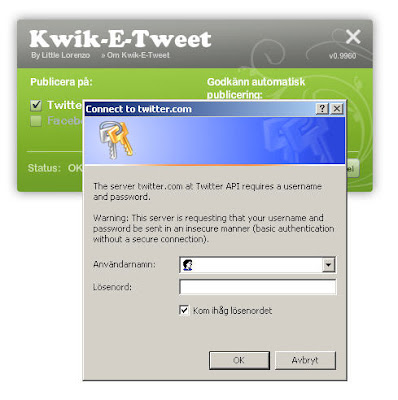
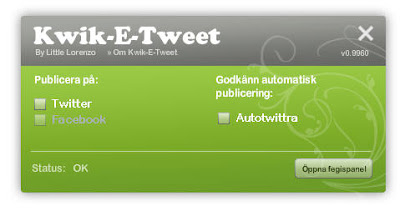
2. If you're really brave you just check the "Autotwittra"-box and Kwik-e-tweet will start tweeting away with your followers. If you want to have a little more control, click the "Öppna fegispanel"-button.
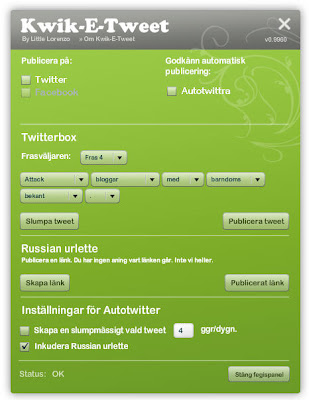
3. The heart of Kwik-e-Tweet. You have (from top to bottom) the Twitterbox, the Russian urlette and the publishing settings.
4. The Twitterbox
This part of the Kwik-e-Tweet is a phrase engine, creating sentences that describe opinions, situations or other that is worth Twittering about. In the dropdown menue shown below you can choose from a couple of different phrases. After choosing a phrase, click "Slumpa tweet" and a sentence will be created. Do this until Kwik-e-Tweet gives you something interesting. You can create your own sentences by choosing words in the dropdown menues.
Publish it to Twitter by clicking "Publicera Tweet" or copy the text and paste it to your Facebook profile.
Play around with it. You'll get it. It´s not rocket science.
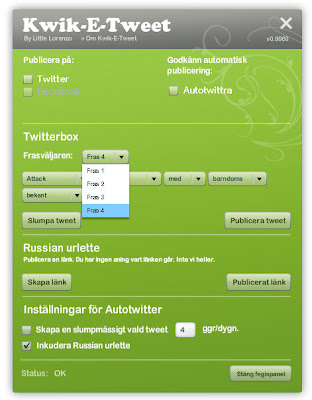
Choosing phrases.
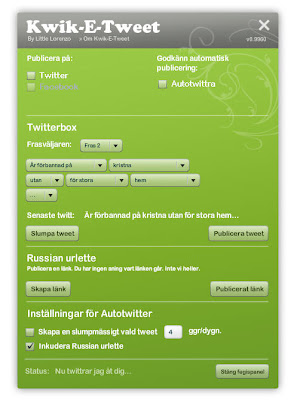
Click "Slumpa Tweet" and your Tweet is made.
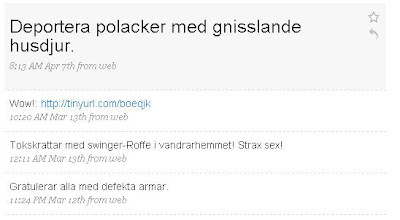
Some examples of Kwik-e-Tweets.
5. The Russian urlette.
It's what it says. It creates a link to a random web page and twitters it. Great for really annoying or confusing your followers. "Why on Gods earth is he posting a link about noses?"
6. Publish settings.
Choose if you want Kwik-e-tweet to automatically tweet, or if you want to do it manually. Choose how often Kwik-e-tweet should publish and if the Russian urlette should be activated.
Got it? If not, please make a comment. It's late, I'm tired and most of all - Swedish. My english sounds like the Swedish chef. So bear with my writing.
Either way Kwik-e-tweet will help you. This is how it works:
1. Start the app and log in to Twitter with it.

2. If you're really brave you just check the "Autotwittra"-box and Kwik-e-tweet will start tweeting away with your followers. If you want to have a little more control, click the "Öppna fegispanel"-button.

3. The heart of Kwik-e-Tweet. You have (from top to bottom) the Twitterbox, the Russian urlette and the publishing settings.

4. The Twitterbox
This part of the Kwik-e-Tweet is a phrase engine, creating sentences that describe opinions, situations or other that is worth Twittering about. In the dropdown menue shown below you can choose from a couple of different phrases. After choosing a phrase, click "Slumpa tweet" and a sentence will be created. Do this until Kwik-e-Tweet gives you something interesting. You can create your own sentences by choosing words in the dropdown menues.
Publish it to Twitter by clicking "Publicera Tweet" or copy the text and paste it to your Facebook profile.
Play around with it. You'll get it. It´s not rocket science.

Choosing phrases.

Click "Slumpa Tweet" and your Tweet is made.

Some examples of Kwik-e-Tweets.
5. The Russian urlette.
It's what it says. It creates a link to a random web page and twitters it. Great for really annoying or confusing your followers. "Why on Gods earth is he posting a link about noses?"
6. Publish settings.
Choose if you want Kwik-e-tweet to automatically tweet, or if you want to do it manually. Choose how often Kwik-e-tweet should publish and if the Russian urlette should be activated.
Got it? If not, please make a comment. It's late, I'm tired and most of all - Swedish. My english sounds like the Swedish chef. So bear with my writing.
lördag 4 april 2009
"What's the status" he asked...
Getting the Kwik-e-tweet to connect to Facebook - Check
Making the åäö:s working properly - Well according to how the data is transffered check, but nothing is published.
And then - a new Facebook API! Back to the first step.
Considering of publishing a beta with only Twitter support.
Making the åäö:s working properly - Well according to how the data is transffered check, but nothing is published.
And then - a new Facebook API! Back to the first step.
Considering of publishing a beta with only Twitter support.
Prenumerera på:
Inlägg (Atom)
